

Tag Definitions of Microsoft SQL Server
In vScope, several tags help describe the size attributes of an Microsoft SQL database. The table below provides a quick reference to these tags and their meanings. You can also view a visual representation of a database’s size and storage on the Properties page for each database resource.
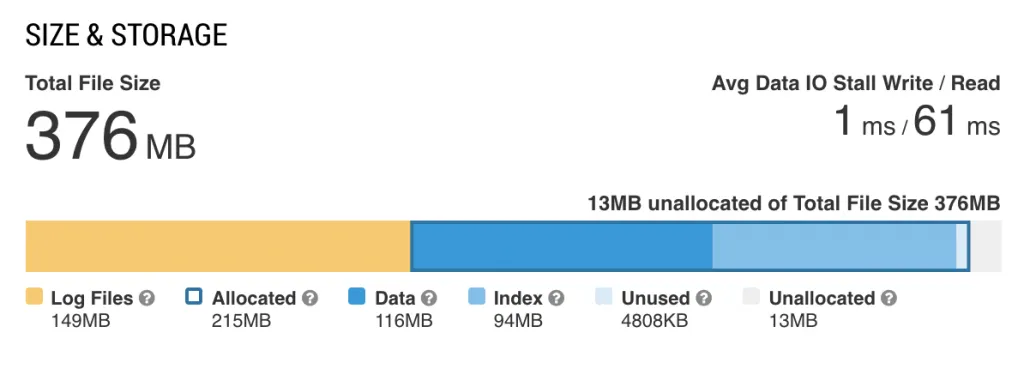
| Tag | Description |
|---|---|
| Allocated size | Total space allocated by objects in the database. |
| Unallocated size | Space in the database that is not yet reserved for database objects. |
| Configuration size | Configured size of the database, as set in its configuration. |
| Log files max size | Sum of maximum sizes set for all transaction log files of the database. |
| Log files total size | Total size of all transaction log files for this database. |
| Unused size | Total space reserved for objects in the database but not yet used. |
| Data size | Total space used by data within the database. |
| Data files max size | Sum of maximum sizes set for all data files in the database. |
| Data files total size | Total on-disk size of all data files in the database. |
| Files max size | Combined maximum size of all log and data files if maximum sizes are specified. |
| Index size | Total space used by indexes within the database. |
| Transaction log size ratio | Ratio of transaction log size to data size. A value of 100% indicates that transaction logs are the same size as the data in the table. |
These tags provide insights into the storage and space utilization of Microsoft SQL databases, assisting in efficient database monitoring and management in vScope.
Security and configuration tags
Section titled “Security and configuration tags”These tags surface hardening and configuration settings for MSSQL databases and database systems, helping you spot risky configurations across your estate.
| Tag | Level | Description |
|---|---|---|
| MSSQL DB Last Backup Location | Database | Physical destination path(s) of the most recent full backup. Useful for spotting backups written only to a local disk on the same server, which do not protect against host failure. |
| MSSQL DB Mirroring State | Database | Mirroring role and state for this database. Database Mirroring is deprecated since SQL Server 2012 — any value indicates legacy HA technology in use. |
| MSSQL DB Page Verify | Database | How SQL Server detects page corruption for this database (CHECKSUM, TORN_PAGE_DETECTION, or NONE). CHECKSUM is the recommended setting. |
| MSSQL DB Trustworthy | Database | True if the TRUSTWORTHY setting is enabled, allowing the database to access resources outside its own security context. Should normally be disabled for user databases. |
| MSSQL DBSys Availability Group Role | Database System | The local replica’s role (PRIMARY or SECONDARY) for each Availability Group this instance participates in. |
| MSSQL DBSys CLR Integration | Database System | True if CLR integration is enabled, allowing managed .NET code to run inside the SQL Server process. |
| MSSQL DBSys Cost Threshold For Parallelism | Database System | Query cost above which SQL Server considers a parallel execution plan. |
| MSSQL DBSys Max/Min Degree Of Parallelism | Database System | Maximum number of CPU threads a single query can use in parallel. 0 means SQL Server decides automatically. |
| MSSQL DBSys Max/Min Server Memory | Database System | Configured maximum/minimum server memory for the SQL Server instance. |
| MSSQL DBSys OLE Automation Procedures | Database System | True if OLE Automation stored procedures can be invoked on the instance, expanding the attack surface. Should normally be disabled. |
| MSSQL DBSys SA Account Enabled | Database System | True if the built-in sa login is enabled — a well-known attack target that should be disabled when not needed. |
| MSSQL DBSys SQL Logins Without Password Policy | Database System | SQL Server logins where CHECK_POLICY is disabled, meaning Windows password complexity and expiration rules are not enforced. |
| MSSQL DBSys SQL Mail | Database System | True if the legacy SQL Mail feature is enabled. SQL Mail is deprecated and less secure than Database Mail; only present on SQL Server 2008 R2 and older. |
| MSSQL DBSys TempDB Data File Count | Database System | Number of data files configured for TempDB. Best practice is one file per CPU core, up to 8. |
| MSSQL DBSys TempDB Files Autogrowth Uniform | Database System | True if all TempDB data files have identical size and autogrowth settings. Mismatched settings cause uneven usage due to SQL Server’s proportional fill algorithm. |
| MSSQL DBSys xp_cmdshell Enabled | Database System | True if the xp_cmdshell extended stored procedure is enabled, allowing SQL Server sessions to execute operating system commands — a serious security risk unless required. |