

Tags
Tags are Name : Value attributes attached to assets. They are used to enrich vScope’s asset repository further, for example describe, classify, and group assets across vScope. vScope includes many built-in tags collected from discovery, and you can also define your own tags.
Why tags matter
Section titled “Why tags matter”Tags make asset data easier to use in day-to-day work:
- They provide consistent metadata for search and filtering.
- They support reporting and segmentation.
- They enable reusable classification logic across large asset sets.
- They let teams enrich discovered data with business context.
Tag model
Section titled “Tag model”Each tag has:
- A name (for example
Operating System). - One or more values on assets (for example
Windows Server 2025).
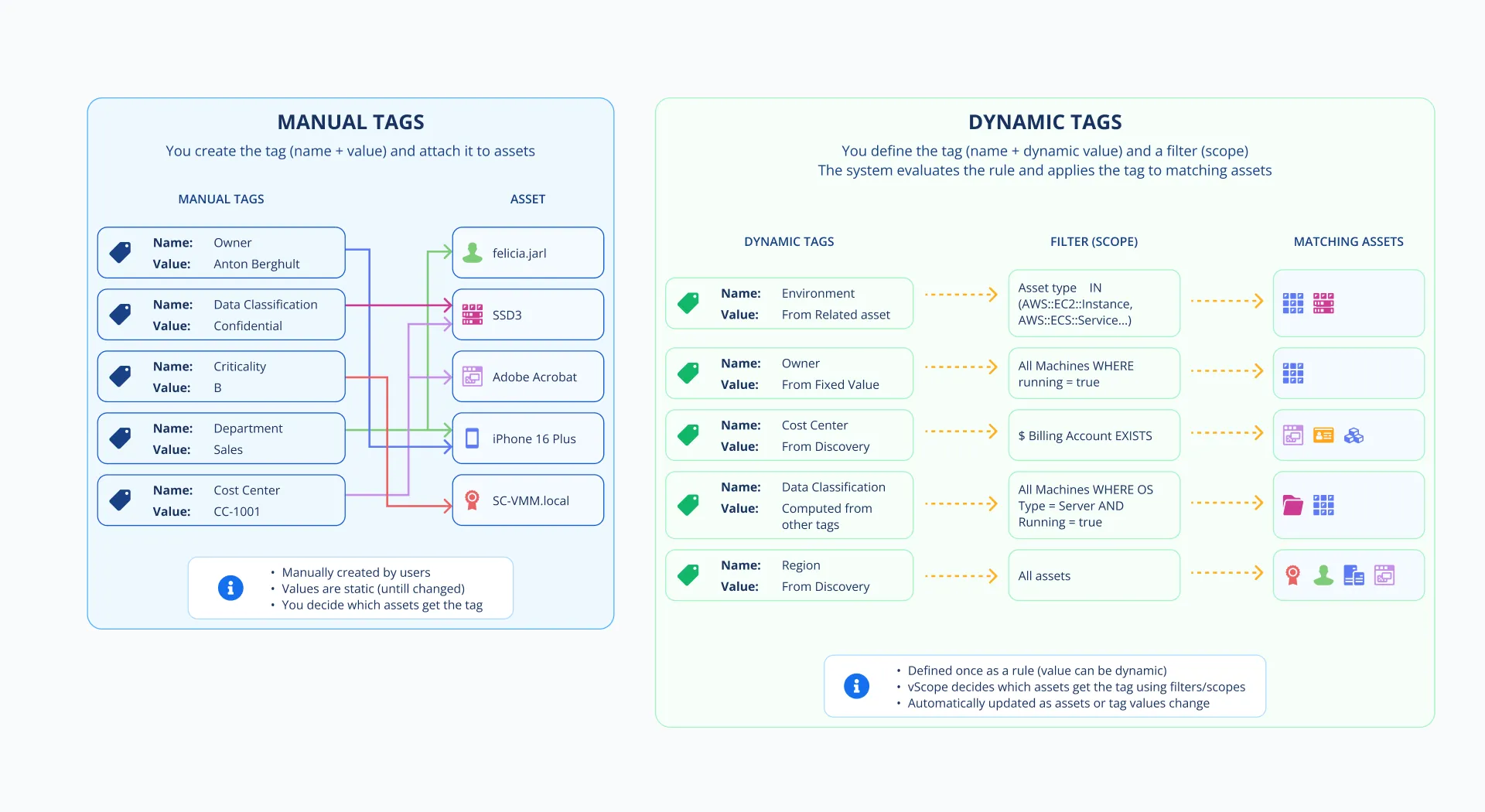
Rule-based tags assign tags to assets based on rules. Within a rule-based tag, values can be entered manually, fetched from a relationship, or fetched from another tag. Manual tags are tags that are fully controlled by the user. Tags from discover fetches values from data sources in discovery manager.
Tag ownership
Section titled “Tag ownership”Tags are either managed by vScope, or managed by user.
- Tags managed by vScope are automatically updated and improved on product updates. Users cannot edit this tags.
- Tags managed by user can be created, updated and removed by Administrators and Contributors.
Lifecycle behavior
Section titled “Lifecycle behavior”Tag values can behave differently over time depending on source:
- Discovery-based values usually change when source data changes.
- Manual values are explicitly set and remain until changed or removed by a user.
- Imported values are one-time-import, and stored as manual values.
- In rule-based tags, values follow the configured method (manual input, from relationship, from other tag, or computed from two other tags).
Manual values are tied to a specific asset instance, not to the underlying rule or discovery data. If an asset is removed — for example, after a data source discovery fails for a long time and the asset repository is reset — its manual tag values are removed with it. Rule-based tags are unaffected, since they are re-evaluated and reapplied once the asset reappears.